
Updated in Version 6.0
Every now and then you may need to trigger a manual run for a source or platform job.
This page explains how to use the Batch Manager to perform this function.
This function is restricted to K Administrators
Manually triggering a source run
-
Select Platform Settings in the side bar
-
In the pop-out side panel, under Platform Settings click on Sources
-
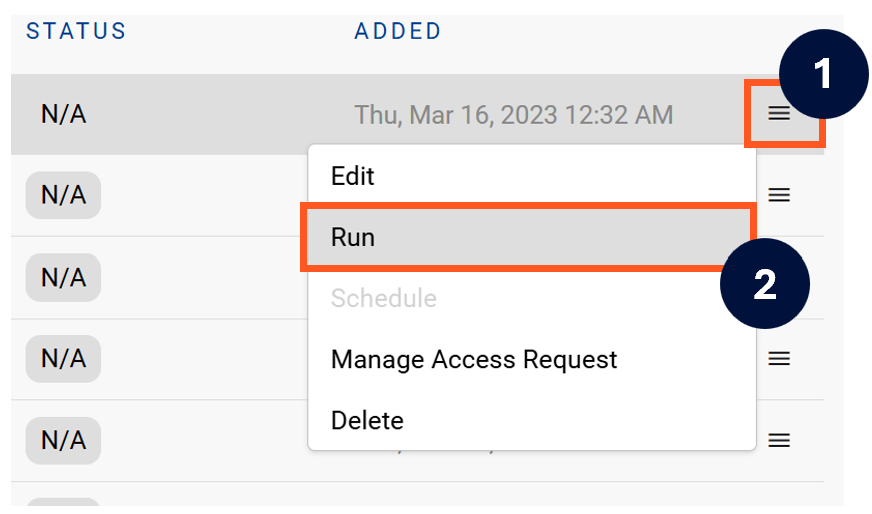
Next to the Source click on the menu icon and select Run
-
After the manual run is triggered, a pop up bar will appear containing a link that can take you to the Monitor tab where you can check the progress of the job.
Troubleshooting failed loads
-
If the job failed at the extraction step
-
Check the error. Contact KADA Support if required.
-
Rerun the source job
-
-
If the job failed at the load step, the landing folder failed directory will contain the file with issues.
-
Find the bad record and fix the file
-
Rerun the source job
-
Manually triggering a platform job
-
Select Platform Settings in the side bar
-
In the pop-out side panel, under Platform Settings click on Batch Manager
-
Select the Platform job you want to manually trigger and click Run
-
A pop-up will appear. Set the manual Click RUN to start the job.
-
In some cases a As_At DATE may need to be provided
-
KADA Support will advise when to set this.
-