
NEW IN VERSION 6.2
The Migration Dashboard helps you plan a move to a new platform. K looks at every asset in scope and recommends a migration strategy, then scores how much effort the move will take and how risky it is.
This page covers how to set up the dashboard, run the analysis, and adjust the rules K uses.
Before you start, make sure that:
-
the sources you want to migrate are loaded into K
-
the K Platform daily and weekly batches have run
Run business lineage first if you can. It isn't required, but it gives better recommendations.
Preparing for migration analysis
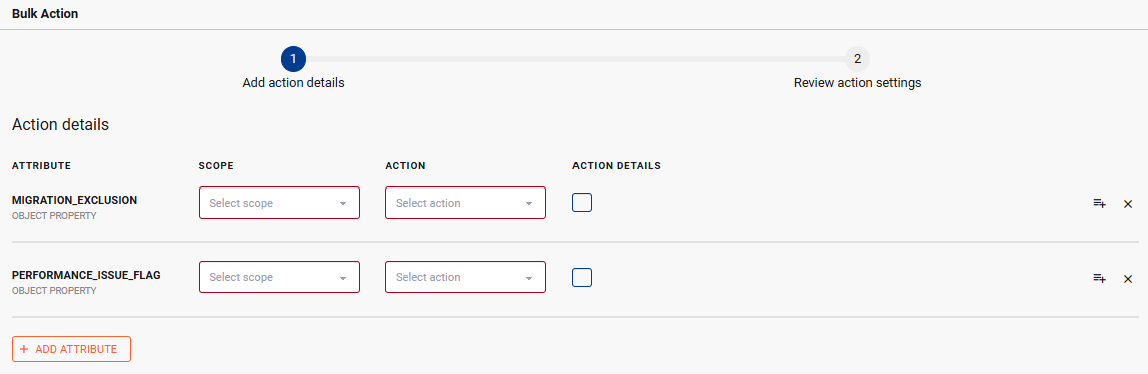
To help K improve the migration analysis, you can tag assets with the following two attributes:
-
Migration Exclusion: Assets tagged with this attribute are excluded from the Migration Dashboard. This is a great way to remove any out of scope assets that could create noise in your Dashboard
-
Performance Issue: These are the assets that you already know have issues and require a redesign prior to migration e.g. not a simple Retire or Refactor migration approach
You can use the Bulk Action function to tag multiple assets quickly.
Create a migration pair
A migration pair tells K what you're moving (Source) and where it's going (Target). The dashboard shows one pair at a time, so you need at least one pair before it has anything to show.
-
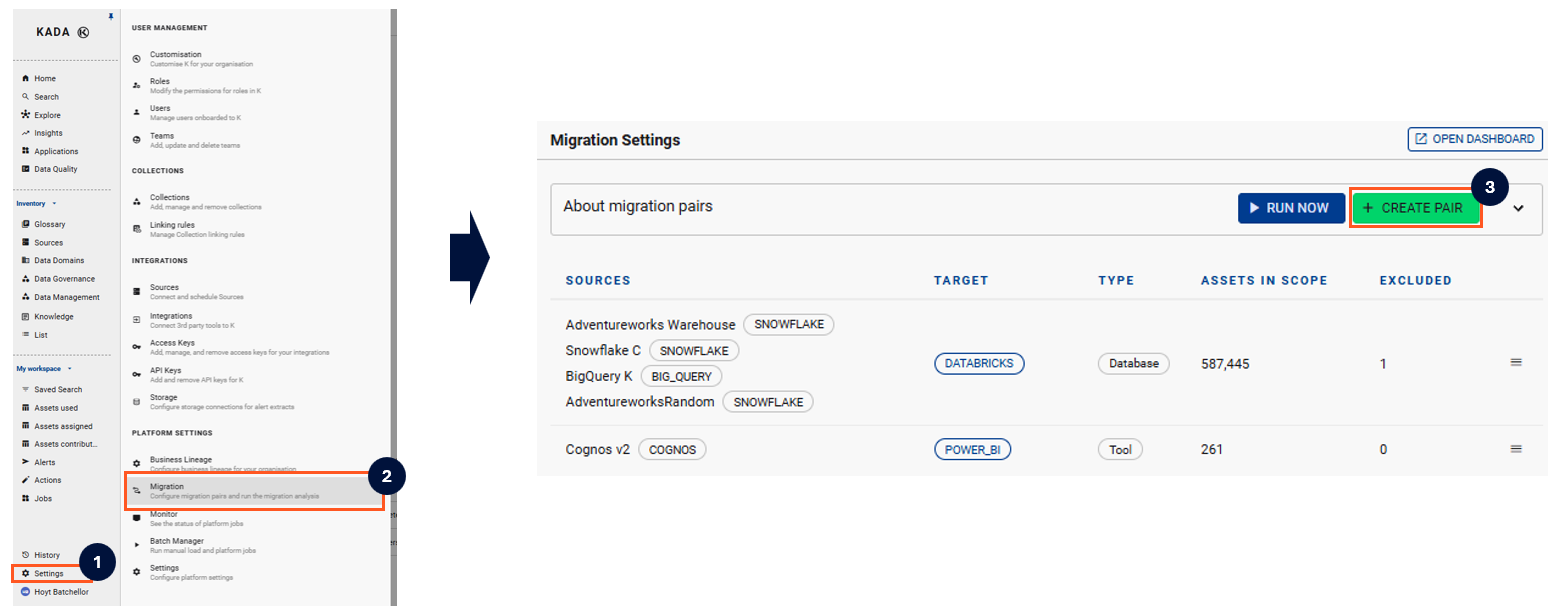
Go to Migration Settings and click CREATE PAIR
-
Choose what's being migrated:
-
Database: database sources move to your database target
-
Tool: tool sources move to one target tool
-
-
Select the target
-
Select the sources to include
-
Click CREATE PAIR
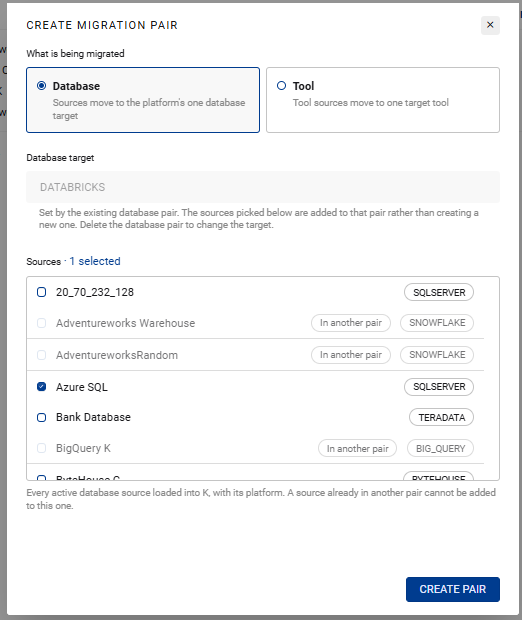
K supports only one database target at a time,Your first database pair sets the target for every database pair after it.
A source can only belong to one pair. Sources already in a pair can't be selected.
Configure the migration analysis settings
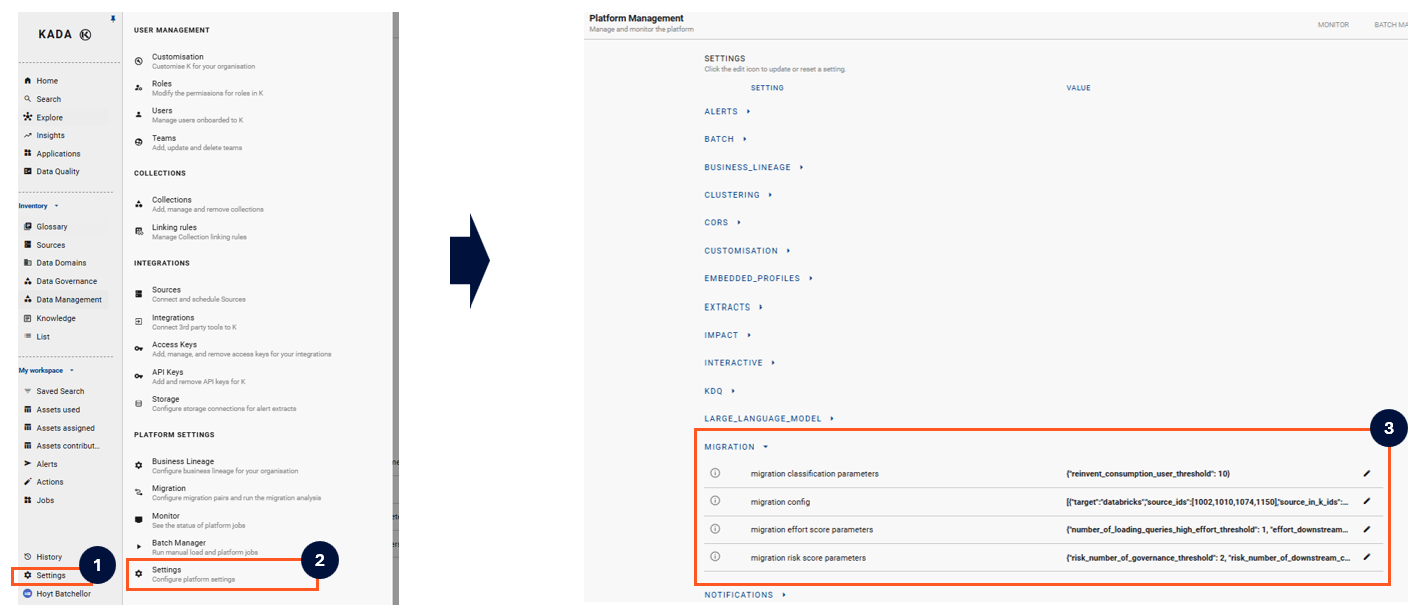
The migration calculations can be modified. The following are the out of the box migration values that can be changed. The calculation inputs can also be adjusted - reach out to the Kada support team to discussion
Migration Effort & Risk Score
The Effort and Risk score are set to High, Medium and Low ratings.
The Effort and Risk score works as a calculation. Every score starts at Low. As each parameter is exceeded, the score moves up 1 Level. The maximum score is High.
|
|
Parameters |
Default |
Description |
Why change this |
|---|---|---|---|---|
MIGRATION CLASSIFICATION PARAMETERS
|
reinvent_consumption_user_threshold |
10 |
Number of distinct users for the asset to be considered widely used |
Configure the figure higher if the definition of widely used is high (e.g. you have a lot of data consumers) |
MIGRATION EFFORT SCORE PARAMETERS
|
number_of_loading_queries_high_effort_threshold |
1 |
Number of complex queries that write to/load this asset |
|
|
effort_downstream_query_threshold |
30 |
Number of unique queries that use this asset |
Configure the figure higher if you have heavy usage across a lot of assets |
|
|
effort_non_portable_code_threshold |
3 |
Number of queries that write to/load this asset that are not portable (lift & shift) |
|
|
|
effort_number_of_non_portable_attributes_threshold |
10 |
Number of attributes that are not portable (e.g. column types that are not portable) |
|
|
|
effort_number_of_downstream_consumption_threshold |
10 |
Number of unique consumption assets linked |
|
|
|
effort_number_of_downstream_presentation_threshold |
10 |
Number of unique presentation assets linked |
|
|
|
effort_number_of_consumption_users_threshold |
10 |
Number of unique users of the asset in the last 120 days |
|
|
MIGRATION RISK SCORE PARAMETERS
|
risk_number_of_governance_threshold |
2 |
Based on the following calculation:
|
Set to a high number (e.g. 6) if governance attributes are not a consideration |
|
risk_number_of_downstream_consumption_assets |
10 |
Number of unique consumption assets linked |
|
|
|
risk_number_of_downstream_presentation_assets |
10 |
Number of unique presentation assets linked |
|
|
|
risk_number_of_consumption_users |
20 |
Number of unique users of the asset in the last 120 days |
|
Run the migration analysis
Click RUN NOW to analyse every pair. You can choose either a:
-
Full run: Recalculate every asset, or
-
Run for not categorised assets: Only process assets that don't have a strategy yet. These are typically new assets or assets previous marked as excluded for migration
Anything a user has changed by hand is never overwritten.

When the run finishes, click OPEN DASHBOARD to see the results.
Change or delete a pair
You can't edit a pair. To change its sources or target, delete it and create a new one. Strategies and scores already on your assets will stay.
How K assigns a migration strategy
K checks each asset against these rules in order. The first rule that matches sets the strategy.
|
Strategy |
When K assigns it |
|---|---|
|
Retire |
The asset is unused or used infrequently |
|
Reinvent |
More than 10 consumption users, and the asset is part of a shared consumption or shared raw source cluster |
|
Redesign |
The asset has a performance flag, and has non-portable attributes or code |
|
Refactor |
No performance flag, and the asset has non-portable attributes or code |
|
Rehost |
No non-portable attributes or code |
Retire recommendations also carry a confidence score: 100 if the asset is unused, 20 if it's used infrequently.
You can change an asset's strategy manually. Where you have manually changed the migration strategy, K retains your choice on future runs.
How K scores migration effort and migration risk
Effort and risk starts at Low and increases based on certain triggers and thresholds.
You can change the default thresholds via Platform Settings
Factors that increase effort
-
Number of downstream queries
-
Migration strategy
-
Reinvent and Redesign is automatically classified as High effort
-
-
Number of non-portable code items
-
Number of non-portable attributes
-
Number of downstream consumption/presentation assets and users
Factors that increase risk
-
Migration effort
-
Number of governance indicators
-
Number of downstream consumption/presentation assets and users