
Pre-requisites
-
Python 3.6 - 3.10 (excluding 3.9.0). Note: 3.9.0 is unsupported. 3.9.1 and subsequent versions are supported.
-
Access to K landing directory
-
Read access to the source that you are going to run the PII Scanner against.
-
Install the corresponding collector package for the source you are scanning.
-
For example if you are scanning Snowflake, you need to also install the Snowflake collector package.
-
If you would like to run the PII scanner on multiple sources, then you will need to install the collector package for all sources.
-
Refer to the Source collector page for instructions on how to install collector packages.
-
Limitations
The Scanner has a number of known limitations. The following scenarios will result in a FAILED scan status:
-
Unable to scan tables with case sensitive names that are usually controlled by quoting in the SQL
-
Unable to scan tables with special characters that break SQL format without quoting
-
Unable to scan tables that are named after keywords which require quoting
-
Unable to scan tables (inclusive of the schema and database names) that contain a period (.) in the name
-
If the table contains a column that causes a data retrieval error
-
If the view has issues executing the underlying Stored Proc or SQL
Step 1: Generate a scanner configuration
The scanner configuration is generated for tables in a database or schema within a database source. You can create the configuration from a database profile, a schema or from search.
For all tables in a database or schema
-
Log into K
-
Go to a Database or Schema profile page
-
Click on the More button and select Custom Export via Ask K
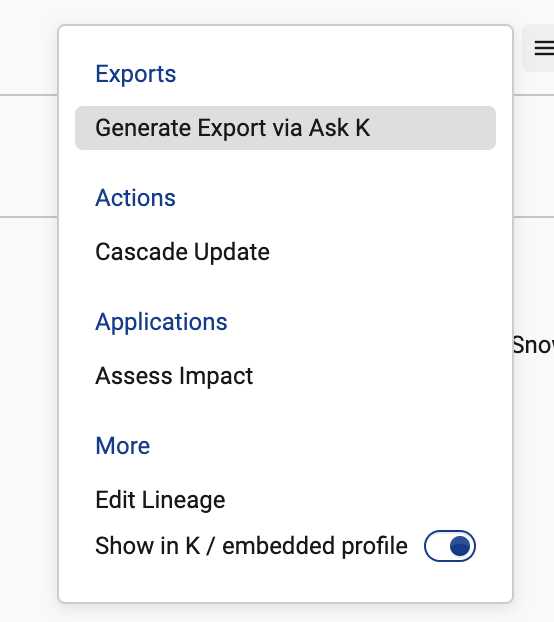
-
Select K data scanner scope. Click to generate the configuration
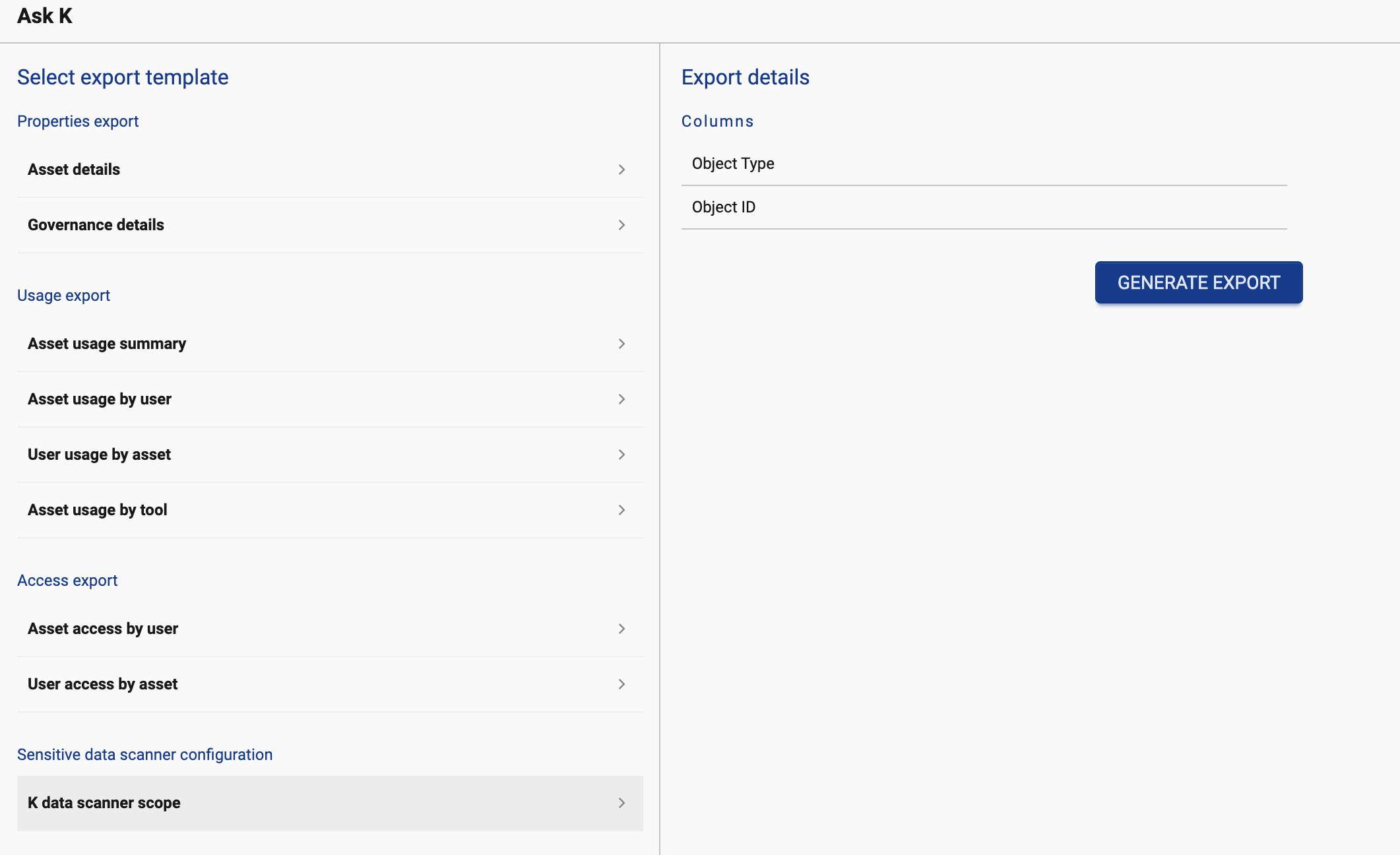
From Search
-
Go to Search
-
Apply any filters to tables as necessary such as selecting multiple schemas to scan

-
Click on the download button and select Custom export via Ask K
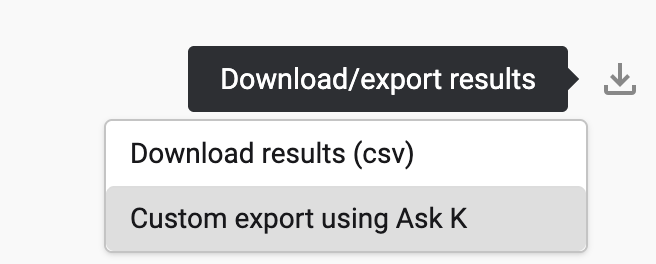
-
Select K data scanner scope. Click to generate the configuration
Step 2: Install the PII Scanner Collector
The PII Scanner Collector is hosted in KADA's Azure Blob Storage. Reach out to KADA Support (support@kada.ai) to obtain the collector package and receive a SAS token to access the repository.
Make sure that you've already set up the collector packages for the Sources (e.g. Snowflake) that you'd like to run the PII Scanner Collector on.
Step 3: Configure the Collector
Check to ensure that the following steps have been completed:
-
Installed the relevant Source Collector .whl
-
Installed any external dependencies described on the Source Collector page
-
Installed the common library package
kada_collectors_lib-<version>-py3-none-any.whlor higher -
Installed the PII Scanner .whl (as per Step 2)
-
Created the Source Collector config json file as described on the Source Collector page
Wrapper script: kada_pii_scanner.py
import csv
import argparse
from kada_collectors.extractors.utils import load_config, get_generic_logger
from kada_collectors.extractors.pii_scanner import PIIScanner, VALID_DEFAULT_DETECTORS

get_generic_logger('root')

parser = argparse.ArgumentParser(description='KADA PII Scanner.')
parser.add_argument('--extractor-config', '-e', dest='extractor_config', type=str, required=True)
parser.add_argument('--objects-file-path', '-f', dest='objects_file_path', type=str, required=True)
parser.add_argument('--source-type', '-t', dest='source_type', type=str, required=True)
parser.add_argument('--sample-size', '-s', dest='sample_size', type=int, required=True)
parser.add_argument('--parrallel', '-p', dest='concurrency', type=int, default=1)
parser.add_argument('--default-detectors', '-d', dest='default_detectors', type=str)
parser.add_argument('--delta', '-a', dest='delta', action='store_true')
parser.add_argument('--pii-output-path', '-o', dest='pii_output_path', type=str, required=True)
args = parser.parse_args()

def read_validate_object_file(file_path):
    with open(file_path, 'r', encoding='utf-8') as csv_file:
        reader = csv.reader(csv_file, delimiter=',')
        header = next(reader)
        if [x.upper() for x in header] != ['OBJECT_TYPE','OBJECT_ID']:
            raise Exception('Invalid object file')
        return [x for x in reader]

if __name__ == '__main__':
    extractor_config = load_config(args.extractor_config)
    object_list = read_validate_object_file(args.objects_file_path)
    default_detectors = [x.strip() for x in args.default_detectors.split(',')] if args.default_detectors else []
    pii_scanner = PIIScanner(args.source_type, args.sample_size, args.concurrency, object_list, args.pii_output_path, default_detectors=default_detectors, delta=args.delta, **extractor_config)
    pii_scanner.scan()
Example execution:
python kada_pii_scanner.py -e ./kada_snowflake_extractor_config.json -f ./pii_test_scan.csv -t snowflake -s 10 -p 8 -o /tmp/output -d Email,AUPhoneNumber,CreditCard,AUTaxFileNumber,AUZipCode,AUDriversLicense,AUMedicare,AUPassport,AUABN,IPAddress
Arguments:
|
ARGUMENT |
SHORT |
TYPE |
OPTIONAL |
DESCRIPTION |
|---|---|---|---|---|
|
--extractor-config |
-e |
STRING |
N |
Location of the extractor configuration json |
|
--objects-file-path |
-f |
STRING |
N |
Location of the .txt file with list of objects to scan |
|
--source-type |
-t |
STRING |
N |
Source type e.g. snowflake, oracle |
|
--sample-size |
-s |
INTEGER |
N |
Number of rows to sample (0 = all rows) |
|
--parallel |
-p |
INTEGER |
Y |
Parallelism level (default 1) |
|
--default-detectors |
-d |
STRING |
Mandatory unless custom detectors defined |
Comma-separated list: Email, CreditCard, AUPhoneNumber, AUTaxFileNumber, AUAddress, AUDriversLicense, AUMedicare, AUPassport, AUABN, IPAddress |
|
--delta |
-a |
FLAG |
Y |
Produces a DELTA extract file for partial scans |
|
--pii-output-path |
-o |
STRING |
N |
Output folder path for PII extract |
Step 4 (Optional): Defining your own Detectors
Out of the box detectors include: AUAddress, Email, CreditCard, AUTaxFileNumber, AUPhoneNumber, AUMedicare, AUPassport, AUABN, IPAddress, AUDriversLicense (with state variants).
To define your own detector:
from kada_collectors.extractors.pii_scanner import PIIScanner, register_detector, DatabaseDatumDetectors

@register_detector
class MyEmailDetector(DatabaseDatumDetectors):
    def detect(self, datum, column_name):
        matches = []
        if not isinstance(datum, bool):
            if '@' in str(datum):
                matches.append(pii_cls())
        return matches

if __name__ == '__main__':
    pii_scanner = PIIScanner(source_type, sample_size, concurrency, object_list, output_path, **extractor_config)
    pii_scanner.scan()
References
Supported Data Sources
-
Snowflake
-
Oracle
-
Redshift
Object List File
The object list file can be generated via Ask K - Scanner → Generate Scanner Configuration. It must be a comma-separated flat file (UTF-8 encoded) with headers OBJECT_TYPE,OBJECT_ID.
|
HEADER |
TYPE |
DESCRIPTION |
|---|---|---|
|
OBJECT_TYPE |
STRING |
Object type being scanned (currently only TABLE) |
|
OBJECT_ID |
STRING |
4-part ID: |