
NEW IN VERSION 6.1
Knowledge lets any user capture and share context about a data asset, things like how to use it, known caveats, or tips that don't fit neatly into formal metadata. Knowledge Collections are how those notes get grouped and organised.
Unlike most other Collections in K, Knowledge and Knowledge Collections are open to all users. There's no permission gate on who can create one, and no governance controls layered on top.
What is Knowledge?
Knowledge is a general-purpose note you can create and link to any asset. Use it to capture the kind of context a colleague would normally have to ask you for directly, workarounds, background on why something was built a certain way, or a heads-up about a quirk in the data.
You can find and explore Knowledge in a few places:
-
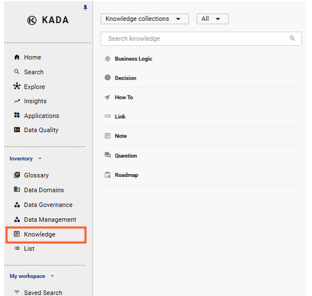
In the left nav, under Inventory, click Knowledge to open the Knowledge slideout and browse all Knowledge Collections and their items
-
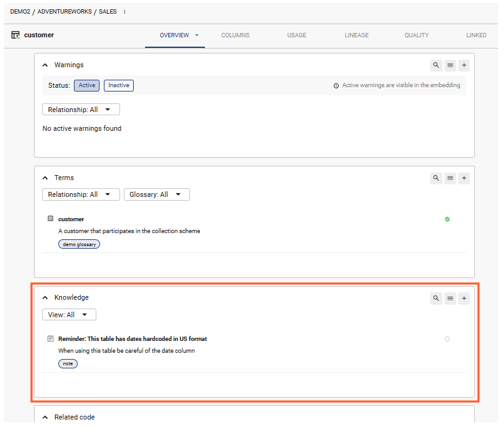
On any asset's Data Profile page, linked Knowledge items appear alongside other linked content
What is a Knowledge Collection?
A Knowledge Collection groups related Knowledge items together, the same way a Glossary groups related Terms. See Understanding Glossaries and Terms for the closest comparison.
Knowledge Collections can be structured hierarchically if you want to nest related topics, but there's no requirement to do so. You can search across all Knowledge Collections and their items from the Knowledge slideout, hierarchy doesn't apply while searching.
Creating and linking Knowledge
You can add a Knowledge item in two ways:
-
Standalone:
-
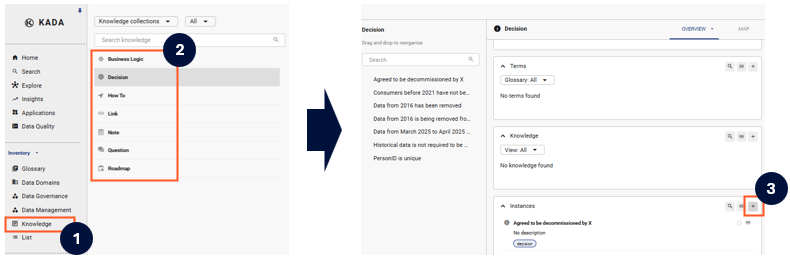
Create a new Knowledge instance on its own, without linking it to anything yet, and link it later
-
-
From a profile page: open the asset you want to add context to, and use the create-and-link option to create the Knowledge item and link it in one step
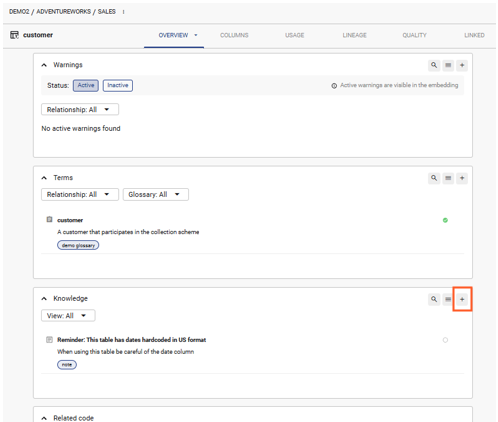
When creating either way, you'll assign the item to a Knowledge Collection so it's easy to find later.
Can I govern Knowledge Collections?
No. Knowledge Collections aren't a governed structure, and that's by design, they're meant for quick, informal contributions rather than controlled taxonomy.
|
Aspect |
Governed Collections (e.g. Business Glossary and Data Management Collections) |
Knowledge Collections (e.g. Business Logic, Notes, Decisions) |
|---|---|---|
|
Who can create one |
Data Managers, Data Governance Managers, and K Admins only |
Any user |
|
Structure |
Defined hierarchy set and maintained by the collection owner |
Optional grouping, no required hierarchy |
|
Governance controls |
Collection Owners can run a Collection Governance Dashboard |
No governance report available |
|
Best for |
Structured metadata that needs consistency and oversight, like classifications, domains, or business terms |
Ad hoc context, tips, and notes that help others understand a data asset |
If you need a structured, permission-controlled way to organise information, use a governed Collection instead