
Updated in Version 6.0
You can hide sheets from a report from being displayed in the Detailed Embedding Sheet section.
This is useful where you have added the Detailed embedding to a dedicated sheet.
Use the following steps to hide the Overview sheet in the detailed embedding.
Step 1) Navigate to the sheet
-
Open the Sheet profile in K
-
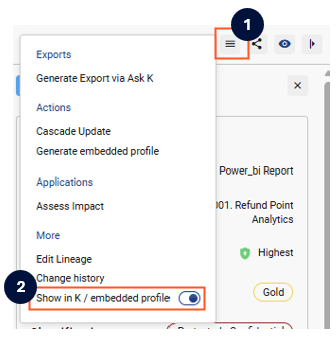
Click on the more actions button
-
Disable the Show in embedded profile option
Step 2) Refresh the Report
-
Refresh the report
-
The sheet will now be removed from the sheet section in the embedding