
K Knowledge Base
Breadcrumbs

Dashboard & Insights

K has a number of helpful Dashboards and Insights pages to support Data Managers and Data Governance Managers in managing and governing their data ecosystem.

🔒 Insights are only accessible to users with Data Manager, Data Governance Manager, or Administrator roles. Business Users and Data Workers will not see this section.

Dashboard data is refreshed daily by default. Your K administrator can configure a more frequent refresh schedule or trigger an ad-hoc refresh via Batch Manager in Platform Settings.
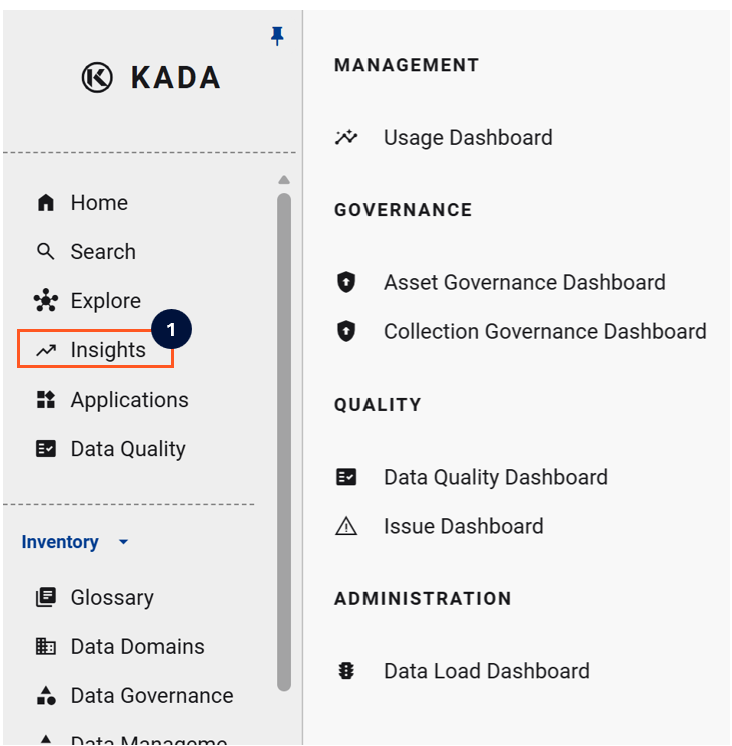
image-20260312-123058.png

Available Dashboards

Management

Dashboard Name

Description

Usage Insights

Drill down on data usage for a specific source or tool — useful for planning migration activity

Complexity Insights

Understand how connected your data assets are to each other (upstream and downstream complexity)

Governance

Dashboard Name

Description

Governance Insights

Track classifications, ownership, and lineage quality across actively used data assets

Data Owner Dashboard

View governance, quality, and usage metrics for assets assigned to a specific Data Owner

Data Steward Dashboard

View governance, quality, and usage metrics for assets assigned to a specific Data Steward

Quality & Issues

Dashboard Name

Description

Data Quality Dashboard

View DQ metrics across domains, categories, and use cases

Data Quality Insights

Drill through DQ by source, domain, collection, or DQ tool

Issue Dashboard

View issues raised on data and content — filter by domain, status, and priority

Administration

Dashboard Name

Description

Data Load Dashboard

Check the current state of metadata loads from connected sources


Usage Insights

The Usage Insights page lets you drill down on usage information for a specific source or tool. Particularly useful when planning migration activity.

image-20260312-123245.png

Usage frequency is calculated as follows:

Frequency

Calculation

Daily

Used in 10+ workdays over the last 3 weeks

Weekly

Used in 3 different weeks over the last 4 weeks

Monthly

Used in 3 different months over the last 4 months

Infrequent

Used at least once within the last 4 months

Unused

Not used within the last 4 months


Complexity Insights

Use Complexity Insights to understand how connected your data assets are. You can select upstream, downstream, or both views, and customise the complexity ranges using the settings icon.

image-20260312-123345.png

Governance Insights

Use the Governance Insights dashboard to track classifications, ownership, and lineage quality across data assets that are being actively used.

image-20260312-123453.png

It also surfaces Recommendations for assets that are missing Data Owners or Stewards.

image-20260312-123522.png

Data Owner & Steward Dashboards

The Owner and Steward Dashboards provide each Data Owner or Data Steward with a focused view of the governance, quality, and usage metrics for their assets.

See Data Owner & Steward Dashboard for full details.

image-20260312-123806.png

Data Quality Dashboard

The Data Quality Dashboard provides an overview of DQ across domains, categories, and use cases. This dashboard is useful for comparing DQ trends across critical areas.

image-20250209-230244.png

Data Quality Insights

The Data Quality Insights page lets you drill through to source, domain, collection, or DQ tool level.

image-20231218-123848.png

Issue Dashboard

The Issue Dashboard provides a summary of all data issues raised in K — filterable by Domain, Status, and Priority. Click any data point to see a list of matching issues, or click Open in Search to download.

image-20260312-123832.png


Data Load Dashboard

Use the Data Load Dashboard to check the current state of source loads into K — view which sources have successfully ingested metadata and flag any load failures.


Tips on Getting the Most from Dashboards

Dashboard

Scenario

How K Helps

Usage Insights

Planning a migration

Filter by data source to see how heavily it's used and which teams to engage

Governance Dashboard

Tracking DG KPIs

Identify governance gaps across used assets vs. unused assets

Data Quality Dashboard

Tracking DQ trends across domains

Identify which assets within a domain are causing the most quality impact

Issue Dashboard

Reviewing crowd-sourced issues

Get an overview of current issues and their status — download for reporting

Data Load Dashboard

Checking platform health

See the current state of source loads into K