
Updated in Version 6.0
K helps different types of data users in your organisation to discover, organise, govern and understand your data and analytical content.
There are 5 main types of roles in K. Below is a high-level overview of the different types of roles, users and accessible features. Refer to the Role Permissions page for a detailed table of what each role has access to.
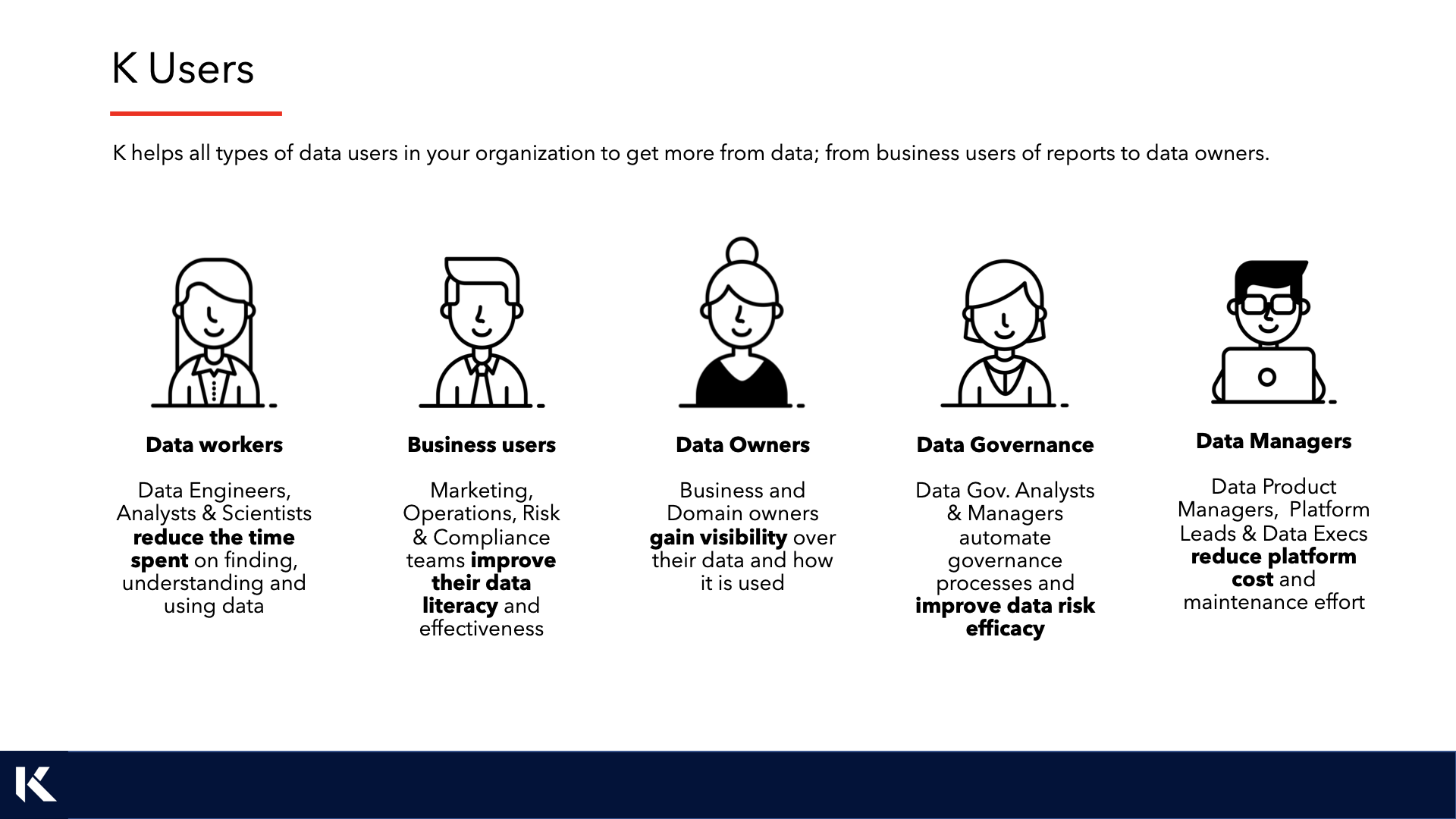
Data Worker

A Data Worker is someone that works with data day to day. They might be a data analyst that wrangles data for insights, a data engineer that builds pipelines to move and transform data, or a data scientist that runs experiments to test features.
As a Data Worker, you can leverage the majority of features in K to discover data, organise your own code, document and share knowledge, run impact assessments, and analyse your data product metrics.
|
Use case |
Feature to use in K |
|---|---|
|
As a Data Engineer, I want to run an impact assessment over a Database Table I am looking at changing so I can see the level of testing and change management I need to undertake. |
|
|
As a Data Analyst, I want to set up an alert on a critical dataset so I am automatically notified when its quality or availability changes. |
|
|
As a Data Scientist, I want to find some web traffic data that I can use to run some models on. I want to find data that has been system generated and not transformed. |
|
|
As a Data Analyst, I want to see a personalised view of the data assets I own and frequently use so I can quickly return to my work without searching each time. |
Business User

A Business User is typically a consumer of data. They use data products like reports, applications and analyses.
As a Business User, you can use K to find reports that your team uses, understand the definition of a term like "Customer", and receive notifications when a data change will impact the data products you use.
|
Use case |
Feature to use in K |
|---|---|
|
As a Risk Analyst, I want to check the definition of delinquency that I found in this dataset. |
|
|
As a new Marketing Analyst, I want to find the reports that my team uses so I can get up to speed quickly. |
|
|
As a Business User, I want to quickly understand whether the data I've found can be trusted before I use it in a report or presentation. |
Data Owner

A Data Owner can be anyone that is accountable for the collection, handling and use of a data product. This can be anyone from the Product Manager of the application that generated the data, to the Business Lead that owns the entire data domain.
As a Data Owner, you can use K to manage your data product, see who is using your data products, and run reports on unused access.
|
Use case |
Feature to use in K |
|---|---|
|
As a Data Owner, I want to find all users that have access to my data that have not used their access in the last 90 days. |
|
|
As a Data Owner, I want to understand how a data asset I own has changed over time and what downstream items may have been impacted. |
Data Governance

A Data Governance user is responsible for guiding the organisation in the proper controls around the collection, handling and use of data. Data Governance is typically part of the Data Function and has unique responsibilities in helping define and drive data lifecycle management, privacy, quality, stewardship, metadata/master/reference data management, security and classification.
As a Data Governance team member, you can use K to manage your data ecosystem's metadata, classify data, review data usage and access, assign stewards, capture quality metrics, and enable lifecycle management.
|
Use case |
Feature to use in K |
|---|---|
|
As a Data Governance Analyst, I want to classify all the PII data we collect and let users of this data know about the updated classification. |
|
|
As a Data Governance Manager, I want to search across code to identify where a specific field is being referenced across the platform. |
|
|
As a Data Governance Manager, I want to organise Finance data to a Finance domain and assign a policy to this data. |
|
|
As a Data Governance Manager, I want to help manage and create new collections to group our data items. |
|
|
As a Data Governance Manager, I want to automatically tag and classify data assets based on predefined rules to reduce the manual effort of governing a large data estate. |
|
|
As a Data Governance Manager, I want to update metadata and collection linkages across hundreds of assets at once, without having to edit each profile manually. |
Data Manager

A Data Manager is responsible for managing the use, cost and access to the platforms, products and tools that make up the data ecosystem.
As a Data Manager, you can identify how much of the ecosystem is being used, by whom, and how often. You can run reports to identify data products that are at the end of their lifecycle, and take actions to maintain a clean and healthy ecosystem.
|
Use case |
Feature to use in K |
|---|---|
|
As a Data Manager, I want to run a cost allocation report for the last month so I can ensure each team is paying for their use of the Snowflake platform. |
|
|
As a Data Manager, I want to identify all the tables that have been created by users that are unused so I can clean them up. |
|
|
As a Data Manager, I want to visualise how data flows across our ecosystem from source systems through to reports, to identify gaps in our data lineage. |
K Platform Administrator
A K Platform Administrator has full access to administer the platform. They are responsible for the initial setup of K, onboarding new data sources and systems, managing user access, and configuring global platform settings.
Administrators are typically your designated K champions or IT/data platform administrators. They work closely with Data Managers and Data Governance teams to ensure the platform is configured to support your organisation's data governance and management objectives.
For a full guide to platform administration, refer to the Admin Guides.
Role Hierarchy
Roles and their permissions are inherited (except where you specifically customise them not to be).
-
Data Workers inherit the same capabilities as Business Users, except Business User search and experience is geared towards Content (reports etc.) whilst Data Workers prioritise Data (Tables, code, etc.)
-
Data Governance inherit the same capabilities as Data Workers with elevated privileges to manage collections, ownership, stewardship configuration, and access to governance insights.
-
Data Managers inherit the same capabilities as Data Governance with the ability to see ecosystem-level insights.
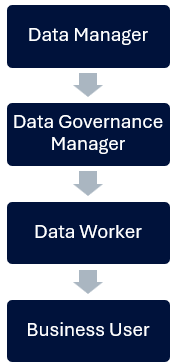
Note: Roles higher up the hierarchy override roles that are below. There is no need to add a Data Manager as a Data Worker as well. Role restrictions you define are not inherited — for example, if you disable editing collections for a Data Manager role, it will not restrict Data Governance roles by default.
Aligning K Roles to Your Organisation
This section is to help K Administrators and K champions consider how they want to set up K user roles for their organisation. Whilst every organisation is different, the following principles should be followed:
Key principles:
-
Start with Business User as your default role. Business User can be configured to apply automatically on login. This is ideal for large organisations where most users are consumers rather than data producers.
-
Assign Data Worker to data practitioners only. Data Workers have access to technical features like Impact Assessment and Actions that business users typically don't need.
-
Limit Data Governance roles to your governance team. The Data Governance role provides access to platform customisation settings and governance-specific dashboards. Over-assigning this role can create governance inconsistencies.
-
Data Manager is typically a small group. Reserve this for people who are responsible for the oversight of your data platforms (e.g., data platform leads, CDO office). This role provides access to ecosystem-level usage insights and ecosystem management capabilities.
-
Keep Administrators to a minimum. Administrators have full platform access. Assign this role to designated K platform champions and IT administrators only.
A note on Data Owners and Stewards: Data Owner and Data Steward are not K roles in the traditional sense — they are designations assigned to individual data assets in K. Any K user can be assigned as a Data Owner or Steward, and they will automatically gain access to their personalised Owner and Steward dashboards when this designation is applied.