
UPDATED IN VERSION 6.1
Through the search results page, you can continually refine your search results to help support other key activities such as bulk actions and creating saved filters.
Key Elements of a Search Page
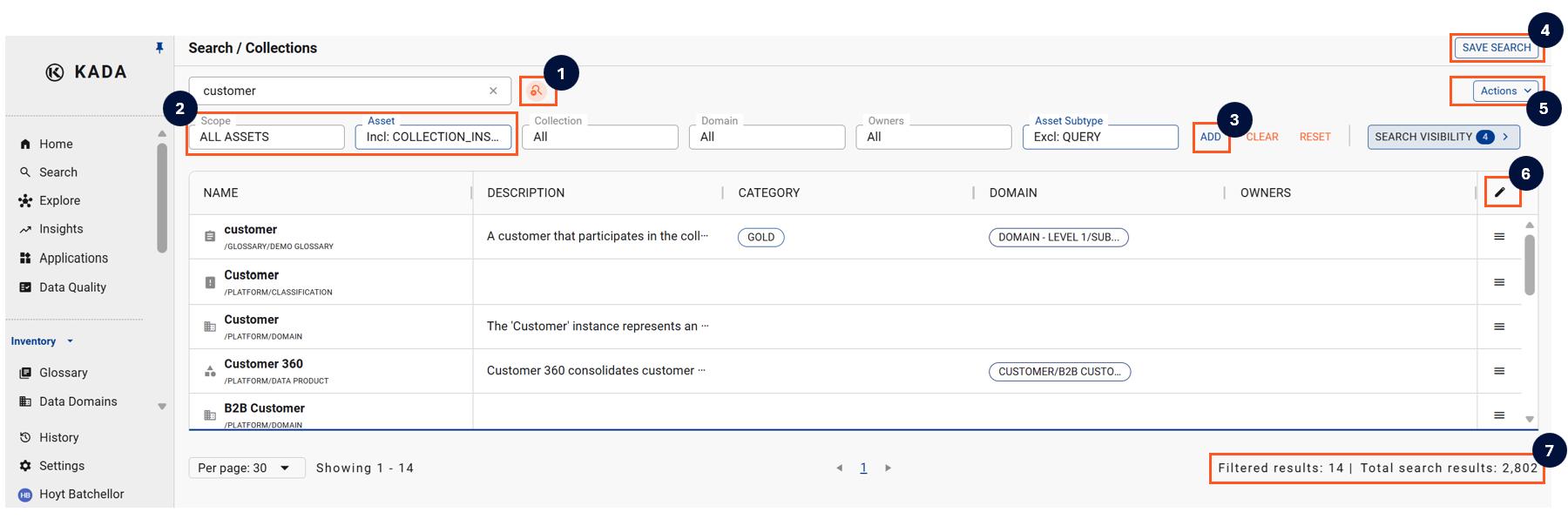
Below is an outline of some of the key elements of a Search results page
-
Change the global search settings to help refine search function (e.g. changing to exact match or changing search universe by removing reference objects)
-
Scope and My Collection Instances filters — always shown first in the filter bar. Scope lets you narrow results to:
-
All assets
-
My direct assets (you're owner/steward)
-
My assets via collection instance (linked to a collection you own/steward). My Collection Instances lets you pick specific collection instances you own or steward. Selecting one also includes its child instances automatically.
-
-
Click Add to open the Add Filters modal and bring in more filters to reduce search results. Filters are grouped by category (Catalog, Collections, Properties) with a short description under each one. Refer to Filter tips for more information
-
Click Save Search to quickly access the current filters settings via the Saved Search page
-
Click on Actions to access a range of features including:
-
Bulk action
-
Bulk edit via Excel
-
Exporting search results
-
Custom export via Ask K
-
-
Edit the columns
-
See the total number of filtered results relative to the total search result
A number of preset filters have been hidden as it is not expected that they should be regularly changed. These include:
-
Excluding Reference objects
-
Excluding Deleted assets
-
Excluding data assets specifically hidden by your Data Governance Managers and Admin users
-
Excluding assets hidden in the source system
To view and change these default settings, click the Search Visibility button
Default K Saved Search settings
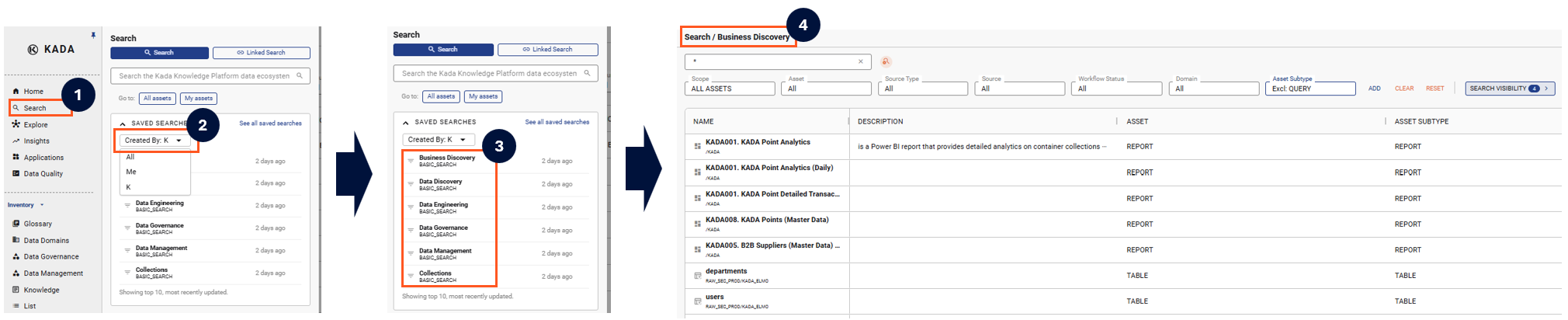
While you’re still getting familiar with the different filter settings, the K Platform has some default saved search filter settings that might be helpful.
There are 6 default Saved Searches
|
Saved Search View |
Objective |
Default Filters |
Default Columns |
|---|---|---|---|
|
Business Discovery |
Assist business users locate trusted data assets and quickly see it's Category, Classification, Domain, and Trust level |
Object Type Source Workflow Status Domain |
Name Alternate Name Location Object Type Category Classification Domain Trust |
|
Data Discovery |
Help data users quickly identify helpful data assets, including the verified use case |
Object Type Source Location Workflow Status |
Name Location Alternate Name Object Type Category Classification Domain Trust Verified |
|
Data Engineering |
For data engineers, additional columns to help them quickly search through Databases, Schemas and Tables |
Object Type Source Location Database Schema Workflow Status |
Name Location Object Type Database Schema Category Classification Domain Trust Verified |
|
Data Governance |
Help data governance managers quickly filter and view key information that supports data governance |
Object Type Source Workflow Status Domain Owners Stewards |
Name Location Object Type Category Classification Domain Trust Owners Stewards Verified Not Verified Number of open issues Overall DQ Score |
|
Data Management |
Help data managers search for data assets and optimise the data ecosystem by reviewing the usage, load frequency and size. |
Object Type Source Workflow Status Usage |
Name Location Object Type Category Domain Usage Load Frequency Size MB |
|
Collection & Glossary |
Help users locate and review Collection and Collection Instances |
Object Type: Set to Collection Instance Collection Domain Owners |
Name Location Collection Category Domain |
These default K Saved Search views only apply to standard search and not Linked Search