
UPDATED IN VERSION 6.1
The sidebar appears on the right-hand side of every Data Profile Page and provides a persistent summary of the most critical metadata for the asset — without needing to switch tabs.
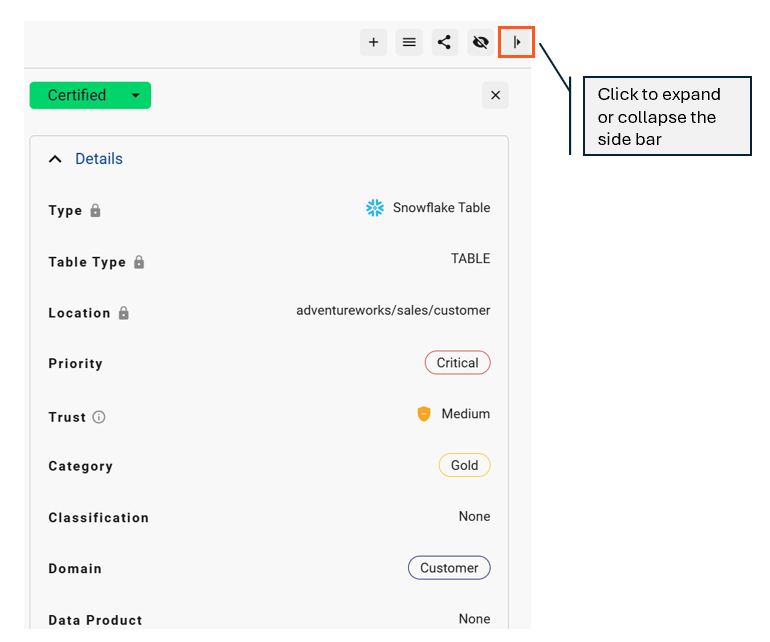
Details
The Details section surfaces the core attributes of the asset.
|
Component |
Description |
|---|---|
|
Type |
The source and asset (object) type |
|
Location |
Location of the asset |
|
Trust Score |
The Trust Score calculated for the asset |
|
Category |
The category assigned to the asset |
|
Classification |
The classification assigned to the asset |
|
Domain |
The domain(s) assigned to the asset |
|
Data Product |
The data product(s) the asset belongs to |
|
Verified For |
Use cases this asset is approved or verified for |
|
Do Not Use For |
Use cases this asset should not be used for |
|
Refresh Time |
The time the data asset is refreshed or updated |
|
Layer |
Business Lineage Layer the data asset is part of. Options include: Raw, Consumption, Presentation |
Review
|
Component |
Description |
|---|---|
|
Review Date |
Date asset was last reviewed or certified |
|
Review Frequency |
Frequency the data asset should be reviewed |
|
Next Review Date |
Calculated field based on review date and review frequency |
Contacts
Lists the Data Owners and Stewards assigned to the data asset
|
Component |
Description |
|---|---|
|
Owner |
The owner(s) assigned to the asset |
|
Steward |
The steward(s) assigned to the asset |
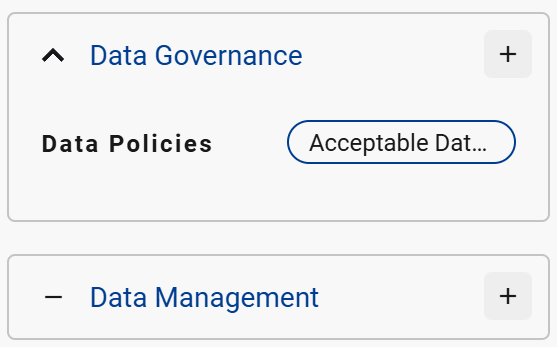
Data Governance and Data Management
Lists and Data Governance collections and Data Management collections that have been linked to the data asset
Other components
|
Component |
Description |
|---|---|
|
Tags |
Tags currently linked to this asset |
|
Channels |
Collaboration channels linked to this asset (e.g. Slack, Teams) |
|
Load Schedule |
The fequency this data asset is loaded |
|
Load Status |
Status of the most recent data load |
|
Masked |
Whether PII masking is applied to the data asset |
|
PII Data Detected |
If K has detected potential PII data in the data |
|
PII Metadata linked |
If PII metadata has been detected in the data asset e.g. column name |
|
Usage |
The usage frequency |
|
Zone |
The type of asset: Raw, Consumption or Adhoc Raw: Created and used by non people users Consumption: Used by people users Adhoc: Created and used by people users |
Related