
This page will guide you through the setup of Tableau Server in K using the direct connect method.
Integration details
|
Scope |
Included |
Comments |
|---|---|---|
|
Metadata |
YES |
|
|
Lineage |
YES |
|
|
Usage |
YES |
|
|
Sensitive Data Scanner |
N/A |
|
Step 1) Tableau Server Configuration
The following Tableau server settings needs to be configured.
-
Tableau Metadata API must be enabled: https://help.tableau.com/current/api/metadata_api/en-us/docs/meta_api_start.html
-
Tableau Repository must be accessible: https://help.tableau.com/current/server/en-us/perf_collect_server_repo.htm
-
The repository user will be used by the KADA extractor / collector.
-
Tableau repository default database name:
workgroup -
Tableau repository default user:
readonly
-
-
Changing these settings will require a restart of the tableau server.
Step 2) Setup Tableau APIs Access
-
A user needs to be configured to access Tableau API.
The user must exist on tableau server as REST APIs do not support SSO. See https://help.tableau.com/current/api/rest_api/en-us/REST/rest_api_concepts_auth.htm
-
User needs
Site Administrator CreatororServer Administratorrole. Roles are dependent on both Licensing and Server version — see https://help.tableau.com/current/server/en-us/users_site_roles.htm-
Site Administrator Creatoris only available on Role Based Licensing Model -
Server Administratoris available on both Role Based and Core Based Licensing Model
-
Step 3) Manually run an ad hoc load to test
-
Select Platform Settings in the side bar
-
In the pop-out side panel, under Platform Settings click on Sources
-
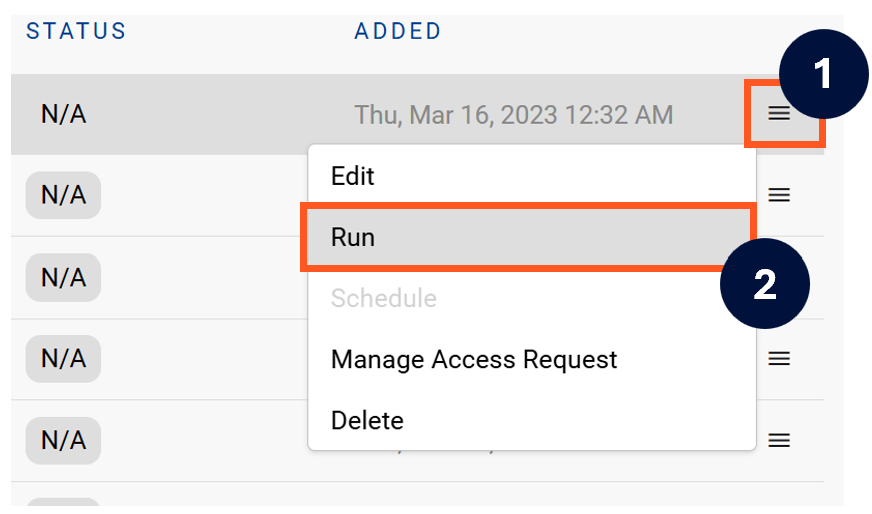
Next to the Source click on the menu icon and select Run
-
After the manual run is triggered, a pop up bar will appear containing a link that can take you to the Monitor tab where you can check the progress of the job.
Troubleshooting failed loads
-
If the job failed at the extraction step
-
Check the error. Contact KADA Support if required.
-
Rerun the source job
-
-
If the job failed at the load step, the landing folder failed directory will contain the file with issues.
-
Find the bad record and fix the file
-
Rerun the source job
-